Got a tip for us?

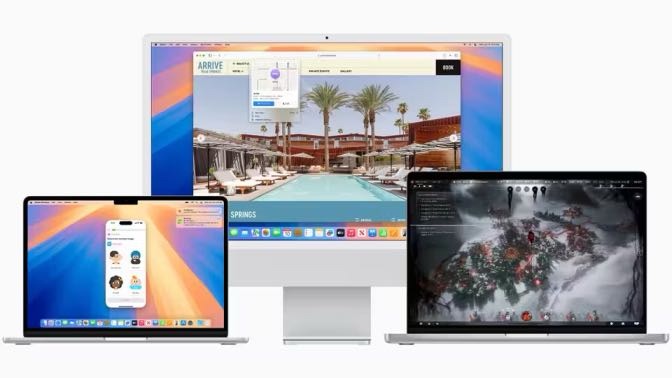
If you live with sight loss, going to a new college or university can bring a host of new experiences and challenges. Stressing over your assistive technology should not be one of them. The inevitable question will arise: What computing platform should you choose for your academics? Mac or Windows?

If you’re blind, in a hurry and want to get to the meat of this article, the correct choice is a Mac. Now here’s why.

1. Cost vs. Benefits

If you’re a time-crunched student who has to sort out accessible books, travel, classes and other school concerns, you want a computer that saves you time. Macs do this by bundling all of the needed software with the machine. In addition to VoiceOver and Zoom, Macs come with built-in productivity tools such as Pages, Numbers and Keynote. These apps are accessible right away and there’s no need to install anything else to get them to work with the assistive technology.

The trade-off is cost. Yes, Macs can be more expensive in the short term, but the alternative is buying a PC, paying for and installing a screen reader, paying for and installing productivity apps and configuring the machine to your liking. When all is said and done, you may actually lose time installing and configuring extra software whereas with a Mac, you can simply turn the machine on and start working right away.

2. The Apple Ecosystem

When you buy any Apple product, you’re jumping into the Apple ecosystem. Macs, iPhones, AirPods, HomePods and iCloud all work together seamlessly. This is another time saver if you’re a blind student looking to have everything work the first time with no let downs. This not only lets you focus on your studies, but you are creating an ecosystem of products that can grow as you purchase Apple products down the road.

3. Low Maintenance

It’s 2 in the morning and you’ve got a major paper due in 7 hours. As you’re settling into your writing flow, do you want to be interrupted with reminders to defragment your hard drive, scan for viruses and check for malware? Macs are known for their easy-to-use interfaces and low maintenance requirements. When you’re in school, you don’t need the extra distraction.

Further, VoiceOver gets updated when macOS does, so there is no need to worry about installing drivers, patches or fixes. VoiceOver will even recognize refreshable braille displays simply by plugging them into your Mac.

4. Interoperability

In the past, blind students often had to rely on specialized (and ugly) equipment to take notes or use a calculator. Today, the most inexpensive Mac can do all of this and much more. The days of specialized and expensive equipment for the blind student is over. Today, it’s easy to collaborate with classmates on a Pages document, exchange Excel and PowerPoint slides with a teacher or even share musical ideas in GarageBand.

5. Performance

If you’re a blind student, having a computer that just works can make the difference between missing a deadline for a term paper and handing it in before everyone else. Macs break down less often, have rock solid security features and are extremely fast and responsive. VoiceOver users can easily and quickly use large spreadsheets, write code or even edit audio without freezing or laggy performance. This can often make you the most efficient Mac user in the class.

Macs are the right choice for the blind student who simply wants to get work done without having to worry about the technology hindering their academic performance. There is a ton of online support for blind and low vision Mac users including how-to guides, podcasts and videos.

The iPhone 17 is now available, but you probably have questions about it. Namely, can iPhone 17 take pictures under water? Here’s what you need to know about this Apple phone’s water resistance.

QUICK ANSWER

  • The iPhone 17 has a water resistance rating but is not waterproof, so it cannot take pictures underwater without a waterproof case.
  • The iPhone 17’s water resistance is limited to fresh water and will not protect against damage in salt water or chemically treated pools.
  • Water damage is not covered under warranty, so if you damage your iPhone 17 by submerging it without a case, you will have to pay for repairs.

One of the most common things that people do with an iPhone is take pictures. Of course, most pictures are taken above water, but if you’re wondering if the new iPhone 17 can take pictures underwater, the answer is no, it does not, at least without a waterproof phone case. While the iPhone 17 has a water resistance rating, it’s not waterproof. This means if you submerge your bare phone underwater to take photos without putting it in a case, you’ll risk damaging it. You will have to invest in a waterproof case if you absolutely must take your iPhone underwater for whatever reason.

iPhone 17 Waterproof Rating

The iPhone 17 has an ingress protection rating of IP68. It can be submerged in up to 6 meters of water for up to thirty minutes.

Every iPhone since the iPhone 7 has received an ingress protection (IP) rating to assess its water-resistance. Every IP rating has two digits.

The first digit ranges from 0–6 and measures a device’s protection against solids, such as dust and dirt. The second digit ranges from 0–8 and measures a device’s protection against liquids. A score of 8 means the device can be submerged beyond one meter of water, with the exact distance and time of submersion specified by the phone manufacturer.

However, it is important to note that IP ratings are not permanent. Like any other phone, the iPhone 17’s water resistance will degrade over time. That’s due to a few factors. Namely, they rely on tightly packed parts glued in place, which prevents water from reaching the components. But normal usage can shift and slide these components around, not to mention accidentally dropping your phone or knocking it against something. These will all cause the water resistance of any phone, including the iPhone 17, to degrade. Furthermore, the iPhone 17 has openings, such as a USB-C port, where water could still make its way in. And once the tightly-packed components move around and the glue breaks, water is free to contact almost anything inside.

Can iPhone 17 Take Pictures Under Water?

The iPhone 17 can not take pictures underwater unless you invest in a quality case that seals the phone and keeps it secure from water damage.

You might be OK with a simple plastic case in shallow water. Heavier-duty aluminum cases with a fully waterproof seal or mounting systems and lens attachments could be even better, depending on the type of photos you want to capture.

Can I Use My iPhone 17 Underwater?

We don’t recommend using your iPhone 17 underwater. An iPhone’s water-resistance wears down over time. Most people want to use their iPhone as an underwater camera, but they weren’t really designed to do that.

Keeping Your iPhone Safe Around Water

If you plan on bringing your iPhone 17 to the beach or pool frequently, consider getting a waterproof phone case. These are basically sealed pouches that keep water away from your phone while letting you use the camera, touchscreen and other controls.

For everyone gearing up for a semester of college, we’ve put together a list of the best Mac apps for college students.

Technology has changed the way by which college students approach their education and how teachers present in the classroom. A college student has access to a vast number of apps on their computers. Choosing the right kind of app can help you complete the assignment, gain or retain knowledge, and increase the learning outcome. We’ll show you some of the best Mac apps for college students that are sure to come in handy during this academic year.

The best Mac apps for college students

Here are the best Mac apps for college students:

Manuscripts

Manuscripts is a word processor that simplifies the academic writing process and eliminates one more excuse to procrastinate. It offers the standard features you would expect from a text editor, but the layout is very intuitive.

What Manuscripts truly excels at is handling footnotes, annotations, and references. It makes academic writing and meeting style requirements fairly straightforward and painless.

iStudiez Pro

iStudiez Pro is a student-oriented organizer application. It will help you keep track of your classes, assignments, deadlines, and exam dates, among other things. It has a well-designed, clean, and intuitive interface, so you don’t have to be particularly tech-savvy to learn how to use it.

Everything you save on it will be synchronized on multiple platforms, and it supports macOS, iOS, Windows and Android.

MacFly Pro

College students typically don’t excel in the tidiness department. If you are no exception, then MacFly Pro might be just what you need. It might not clean your dorm room, but it will help you detect and remove any useless files on your Mac.

It won’t be long until your Mac is full of duplicate files from completing assignments. This could mean academic paper copies, textbooks in PDF format, essay drafts, discarded apps or anything else you may have accumulated while doing research or studying. To better organize your study materials, you can also merge your PDF files.

XMind

XMind is great for when you have to do group projects with your colleagues. It allows you to map out the different tasks and sub-tasks that need to be completed to see the connections between the tasks in a more intuitive way. With a few drags and drops, you can get a clear yet detailed view of even the most intricate projects.

In other words, XMind lets you see the big picture so you can break down a complex assignment into manageable parts.

Prizmo

Prizmo offers optical character recognition (OCR) in 23 languages, translation in 50 languages, text-to-speech, iCloud support, and powerful editing features.

You can use it to turn printed paper, photocopies of textbooks and screenshots into digital text – something you’ll definitely need as a college student. It even has batch OCR support for multipage documents and it corrects any distortions like skewness and warping.

MindNode

If you have trouble organizing your thoughts when working on an assignment, you might want to give MindNode a try. It’s a brainstorming tool that gives you an easy way to approach complex topics.

You can see how you can connect multiple subjects to the main theme so you can get insights and draw informed conclusions. Just what your professors are looking for when giving out these assignments.

Studies

Whether you’re studying law, medicine or mathematics, you’ll want Studies as a companion. Why? Because it will help you achieve your academic goals. How? We’re glad you asked.

You can use Studies to create notes that include links, images, audio and video content and other resources. You can also use it to make a study plan which we assure you that you’ll need.

If you have study buddies, you can share your notes with them and export your notes in different formats to read them on other devices or create flashcards.

Quizlet Plus

Speaking of flashcards, Quizlet Plus can help you out. The best part is that you can also get access to flashcards other students make. Whatever topic you’re studying, chances are you’ll find a few sets to retain the information more easily.

Be Focused

Do you easily get distracted? Be Focused is an app that used psychology to help you stay on track. It was designed to achieve the ideal work-break balance so you can get good grades without risking burnout. Your job is to set your daily goals, and Be Focused will help you get there at a steady and sustainable pace, so you don’t lose your sanity in the middle of the semester.

How do you use it? Easy. You open the app, which will appear in your menu bar and set the timer. It’s also great for keeping track of how much time you’ve spent on each subject or assignment.

Evernote

You can’t make a must-have college app list without including Evernote. This highly popular cloud-based note-taking app can help you collect and sort information quickly. You can create and save your notes in many different formats, it syncs on all your devices, and you can also use it to keep track of deadlines and collaborate with your peers.

Alfred

Alfred basically helps you find stuff on your Mac. If you have a lot of files on your laptop and you don’t want to spend a lot of time looking through them, this app will fish out whatever you need.

You create a keyboard shortcut to open the app and then type in the name of the file or app you’re looking for. But you can also type in a question or look for definitions of terms. This saves you a lot of time that would be better spent actually studying.

Ulysses

Ulysses is a simple tool with a lot of useful features to help you write essays and papers. It offers a dependable and distraction-free writing environment and saves every word automatically. It also makes it a lot easier to stay organized when working on writing assignments since you can tag everything with keywords.

Other major advantages are that it syncs with iCloud Drive, and you can export your work in multiple formats.

Conclusion

With the right kind of tools, you can plan, write, organize, and focus on the studies. Most of the Mac apps for college students discussed in this article are free, so they can easily be part of your educational toolkit.

[iPhone Air](https://www.apple.com/iphone-air/)
– Explore
– [Buy](https://www.apple.com/us/shop/goto/buy_iphone/iphone_air)
– – – – – – – – – ****
– – – # iPhone Air Technical Specifications

iPhone Air

Finish

**Space Black, Cloud White, Light Gold, Sky Blue**

Titanium design
Ceramic Shield 2 front
Ceramic Shield back

Capacity[1](https://www.apple.com/iphone-air/specs/#footnote-3)

– 256GB
– 512GB
– 1TB

Size and Weight[2](https://www.apple.com/iphone-air/specs/#footnote-4)

**Width:**

2.94 inches
(74.7 mm)

**Height:**

6.15 inches
(156.2 mm)

**Depth:**

0.22 inch
(5.64 mm)

**Weight:**

5.82 ounces (165 grams)

Display

– Super Retina XDR display
– 6.5‑inch (diagonal) all‑screen OLED display
– 2736‑by‑1260‑pixel resolution at 460 ppi
– Dynamic Island
– Always-On display
– ProMotion technology with adaptive refresh rates up to 120Hz
– HDR display
– True Tone
– Wide color (P3)
– Haptic Touch
– 2,000,000:1 contrast ratio (typical)
– 1000 nits max brightness (typical); 1600 nits peak brightness (HDR); 3000 nits peak brightness (outdoor); 1 nit minimum brightness
– Fingerprint-resistant oleophobic coating
– Anti-reflective coating
– Support for display of multiple languages and characters simultaneously

The iPhone Air display has rounded corners that follow a beautiful curved design, and these corners are within a standard rectangle. When measured as a standard rectangular shape, the screen is 6.55 inches diagonally (actual viewable area is less).

Splash, Water, and Dust Resistant[3](https://www.apple.com/iphone-air/specs/#footnote-5)

Rated IP68 (maximum depth of 6 meters up to 30 minutes) under IEC standard 60529

Apple Intelligence

Apple Intelligence is integrated across your apps and experiences to help you communicate, express yourself, and get things done effortlessly. With groundbreaking privacy protections, it gives you peace of mind that no one else can access your data — not even Apple.[4](https://www.apple.com/iphone-air/specs/#footnote-6)

[Learn more about Apple Intelligence](https://www.apple.com/apple-intelligence/)

Chip

– A19 Pro chip
– 6‑core CPU with 2 performance and 4 efficiency cores
– 5‑core GPU with Neural Accelerators
– 16‑core Neural Engine
– Hardware-accelerated ray tracing

Camera

– **48MP Fusion camera system**
– 48MP Fusion Main: 26 mm, ƒ/1.6 aperture, sensor-shift optical image stabilization, 100% Focus Pixels, support for super-high-resolution photos (24MP and 48MP)
– Also enables 12MP optical-quality 2x Telephoto: 52 mm, ƒ/1.6 aperture, sensor-shift optical image stabilization, 100% Focus Pixels
– Digital zoom up to 10x
– Customizable default lens (Fusion Main)
– Sapphire crystal lens cover
– True Tone flash
– Photonic Engine
– Deep Fusion
– Smart HDR 5
– Next-generation portraits with Focus and Depth Control
– Portrait Lighting with six effects
– Night mode
– Panorama (up to 63MP)
– Latest-generation Photographic Styles
– Wide color capture for photos and Live Photos
– Advanced red‑eye correction
– Auto image stabilization
– Burst mode
– Photo geotagging
– Image formats captured: HEIF and JPEG

Video Recording

– 4K Dolby Vision video recording at 24 fps, 25 fps, 30 fps, or 60 fps
– 1080p Dolby Vision video recording at 25 fps, 30 fps, or 60 fps
– 720p Dolby Vision video recording at 30 fps
– Action mode up to 2.8K Dolby Vision at 60 fps
– Slo‑mo video support for 1080p at 120 fps or 240 fps
– Dual Capture up to 4K Dolby Vision at 30 fps
– Time‑lapse video with stabilization
– Night mode Time-lapse
– QuickTake video up to 4K Dolby Vision at 60 fps
– Sensor-shift optical image stabilization for video
– Digital zoom up to 6x
– Audio zoom
– True Tone flash
– Cinematic video stabilization (4K, 1080p, and 720p)
– Continuous autofocus video
– Take 8MP still photos while recording 4K video
– Playback zoom
– Video formats recorded: HEVC and H.264
– Spatial Audio and stereo recording
– Wind noise reduction
– Audio Mix

Front Camera

– 18MP Center Stage camera
– ƒ/1.9 aperture
– Autofocus with Focus Pixels
– Retina Flash
– Tap to zoom and rotate
– Center Stage for photos
– Ultra-stabilized video
– Dual Capture
– Center Stage for video calls
– Photonic Engine
– Deep Fusion
– Smart HDR 5
– Next-generation portraits with Focus and Depth Control
– Portrait Lighting with six effects
– Animoji and Memoji
– Night mode
– Latest-generation Photographic Styles
– Wide color capture for photos and Live Photos
– Lens correction
– Auto image stabilization
– Burst mode
– 4K Dolby Vision video recording at 24 fps, 25 fps, 30 fps, or 60 fps
– 1080p Dolby Vision video recording at 25 fps, 30 fps, or 60 fps
– Slo-mo video support for 1080p at 120 fps
– Time‑lapse video with stabilization
– Night mode Time-lapse
– QuickTake video up to 4K at 60 fps in Dolby Vision
– Cinematic video stabilization (4K, 1080p, and 720p)
– Spatial Audio and stereo recording
– Wind noise reduction
– Audio Mix

Power and Battery[5](https://www.apple.com/iphone-air/specs/#footnote-7)

**Video playback**
Up to 27 hours

**Video playback
with iPhone Air MagSafe Battery[6](https://www.apple.com/iphone-air/specs/#footnote-8)**
Up to 40 hours

**Video playback (streamed)**
Up to 22 hours

**Video playback (streamed)
with iPhone Air MagSafe Battery[6](https://www.apple.com/iphone-air/specs/#footnote-8)**
Up to 35 hours

Built-in rechargeable lithium-ion battery

**Fast-charge capable:**
Up to 50% charge in 30 minutes[7](https://www.apple.com/iphone-air/specs/#footnote-9) with [20W adapter](https://www.apple.com/shop/product/MWVV3AM/A/20w-usb-c-power-adapter) or higher (available separately) paired with USB‑C charging cable, or 30W adapter or higher paired with MagSafe Charger (both available separately)

Face ID

Enabled by TrueDepth technology in the Center Stage front camera

Peace of Mind

– Emergency SOS via satellite[8](https://www.apple.com/iphone-air/specs/#footnote-10)
– Crash Detection[9](https://www.apple.com/iphone-air/specs/#footnote-11)
– Roadside Assistance via satellite[8](https://www.apple.com/iphone-air/specs/#footnote-10)
– Messages via satellite[8](https://www.apple.com/iphone-air/specs/#footnote-10)
– Find My via satellite[8](https://www.apple.com/iphone-air/specs/#footnote-10)

Cellular and Wireless

– **Model A3260[**](https://www.apple.com/iphone-air/specs/#footnote-2)**
– FDD‑5G NR (Bands n1, n2, n3, n5, n7, n8, n12, n14, n20, n25, n26, n28, n29, n30, n66, n70, n71, n75)
– TDD‑5G NR (Bands n38, n40, n41, n48, n53, n77, n78, n79)
– FDD‑LTE (Bands 1, 2, 3, 4, 5, 7, 8, 12, 13, 14, 17, 18, 19, 20, 25, 26, 28, 29, 30, 32, 66, 71)
– TDD‑LTE (Bands 34, 38, 39, 40, 41, 42, 48, 53)
– UMTS/HSPA+ (850, 900, 1700/2100, 1900, 2100 MHz)
– GSM/EDGE (850, 900, 1800, 1900 MHz)
– **Apple C1X cellular modem**
– 5G (sub-6 GHz) with 4×4 MIMO[10](https://www.apple.com/iphone-air/specs/#footnote-12)
– Gigabit LTE with 4×4 MIMO[10](https://www.apple.com/iphone-air/specs/#footnote-12)

– **Apple N1 wireless networking chip**
– Wi‑Fi 7 (802.11be) with 2×2 MIMO[11](https://www.apple.com/iphone-air/specs/#footnote-13)
– Bluetooth 6
– Thread networking technology

– **Apple second-generation Ultra Wideband chip**[12](https://www.apple.com/iphone-air/specs/#footnote-14)

– NFC with reader mode
– Express Cards with power reserve

Location

– Precision dual-frequency GPS (GPS, GLONASS, Galileo, QZSS, BeiDou, and NavIC)
– Digital compass
– Wi‑Fi
– Cellular
– iBeacon microlocation

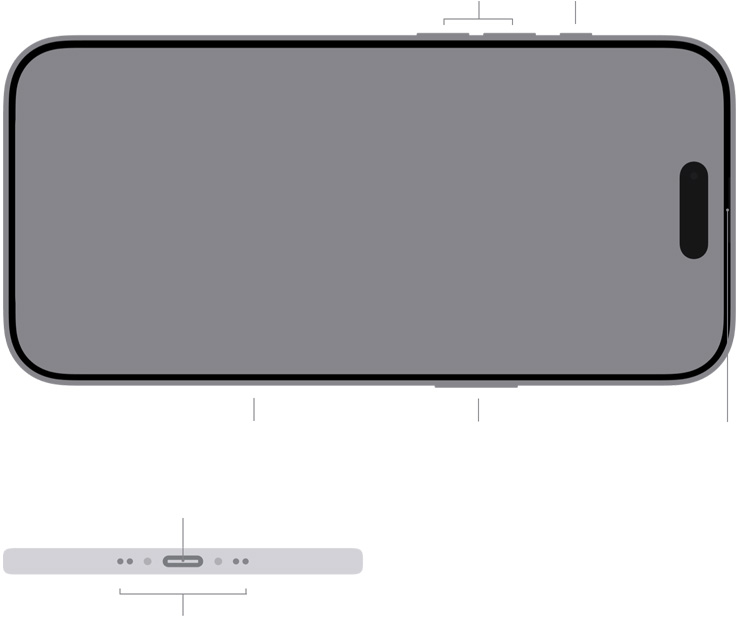
External Buttons and Connectors
![](https://www.apple.com/v/iphone-air/e/images/specs/external_connectors__ggvzl6g7s1yu_large.jpg)

Volume up/down

Action
button

Camera Control

Side button

Built‑in speaker
Built‑in microphone

USB-C connector

Built‑in microphones

**Action button features**

Silent Mode, Focus, Camera, Visual Intelligence,[13](https://www.apple.com/iphone-air/specs/#footnote-15)Flashlight, Voice Memo, Recognize Music, Translate, Magnifier, Controls, Shortcut, or Accessibility

**Camera controls**

Exposure, Depth, Zoom, Cameras, Styles, Tone

Charging and Expansion

– **USB-C connector with support for:**
– Charging
– USB 2 (up to 480Mb/s)

MagSafe and Wireless Charging

– MagSafe wireless charging up to 20W[14](https://www.apple.com/iphone-air/specs/#footnote-16)
– Qi2 wireless charging up to 20W[14](https://www.apple.com/iphone-air/specs/#footnote-16)
– Magnet array
– Alignment magnet
– Accessory Identification NFC
– Magnetometer

Sensors

– Face ID
– Barometer
– High dynamic range gyro
– High-g accelerometer
– Proximity sensor
– Dual ambient light sensors

SIM Card

– Dual eSIM (two active eSIMs; stores eight or more eSIMs)[15](https://www.apple.com/iphone-air/specs/#footnote-17)
– iPhone Air uses advanced eSIM technology for more convenience and security (not compatible with physical SIM cards).

[Learn more about eSIM](https://www.apple.com/esim/)

[Learn more about traveling with eSIM](https://support.apple.com/118227?cid=general-iphone-marcom-08062025)

Apple Pay

– Pay with your iPhone using Face ID in stores, within apps, and on the web
– Send and receive money in Messages with Apple Cash[16](https://www.apple.com/iphone-air/specs/#footnote-18)
– Complete purchases made with Apple Pay on your Mac
– Pay for your ride using Express Transit[17](https://www.apple.com/iphone-air/specs/#footnote-19)

[Learn more about Apple Pay](https://www.apple.com/apple-pay/)

[Learn more about Apple Cash](https://www.apple.com/apple-cash/)

Apple Card

– Credit card created by Apple, designed for iPhone
– Get unlimited 3% Daily Cash at Apple and select merchants when you use Apple Pay,[18](https://www.apple.com/iphone-air/specs/#footnote-20) 2% with Apple Pay, and 1% everywhere else
– Use the Wallet app to apply for, manage, and use Apple Card
– Titanium, laser‑etched physical credit card for use where Apple Pay is not accepted yet
– Share with up to five people, 13 years or older, in your Family Sharing group[19](https://www.apple.com/iphone-air/specs/#footnote-21) to track expenses and manage spending

[Learn more about Apple Card](https://www.apple.com/apple-card/)

Video Calling[20](https://www.apple.com/iphone-air/specs/#footnote-22)

– FaceTime video calling over cellular or Wi‑Fi
– FaceTime HD (1080p) video calling over 5G or Wi-Fi
– Center Stage for video calling
– SharePlay
– Screen sharing
– Portrait mode in FaceTime video
– Spatial Audio
– Voice Isolation and Wide Spectrum microphone modes
– Zoom with rear-facing camera

Audio Calling[20](https://www.apple.com/iphone-air/specs/#footnote-22)

– FaceTime audio
– Voice over LTE (VoLTE)[10](https://www.apple.com/iphone-air/specs/#footnote-12)
– Wi‑Fi calling[10](https://www.apple.com/iphone-air/specs/#footnote-12)
– SharePlay
– Screen sharing
– Spatial Audio
– Voice Isolation and Wide Spectrum microphone modes

Audio Playback

– Supported formats include AAC, APAC, MP3, Apple Lossless, FLAC, Dolby Digital, Dolby Digital Plus, and Dolby Atmos
– Spatial Audio playback with compatible AirPods
– User‑configurable maximum volume limit

Video Playback

– Supported formats include HEVC, H.264, and AV1
– HDR with Dolby Vision, HDR10+/HDR10, and HLG
– Up to 4K HDR AirPlay for mirroring, photos, and video out to Apple TV (2nd generation or later) or AirPlay‑enabled smart TV

Siri[21](https://www.apple.com/iphone-air/specs/#footnote-23)

– Get help with everyday tasks like sending messages, setting reminders, and more
– Activate hands‑free with only your voice using “Siri” or “Hey Siri,” or use Type to Siri
– Protected by the strongest privacy of any intelligent assistant
– Powered by Apple Intelligence, Siri is more natural and helpful[4](https://www.apple.com/iphone-air/specs/#footnote-6)

[Learn more about Siri](https://www.apple.com/siri/)

Operating System

– **iOS 26**
iOS is the world’s most personal and secure mobile operating system, packed with powerful features and designed to protect your privacy.

Privacy

– iPhone is built from the ground up to protect your personal information. Every iPhone has secure facial authentication. Apps need your permission to track your activity across other companies’ apps or websites. Your iMessages and FaceTime video calls are encrypted end-to-end. And much more.

[Learn more about privacy features](https://www.apple.com/privacy/)

Accessibility

Built-in accessibility features supporting vision, mobility, hearing, speech, and cognitive needs help you get the most out of your iPhone — in the ways that work best for you.

[Learn more](https://www.apple.com/accessibility/)

**Features include:**
– VoiceOver
– Zoom
– Magnifier
– Voice Control
– Switch Control
– AssistiveTouch
– Eye Tracking
– RTT and TTY support
– Closed Captions
– Live Captions
– Personal Voice
– Live Speech
– Type to Siri
– Vocal Shortcuts
– Spoken Content

Built-in Apps

App Store

Books

Calculator

Calendar

Camera

Clock

Compass

Contacts

FaceTime

Files

Find My

Fitness

Freeform

Games

GarageBand

Health

Home

iMovie

iTunes Store

Journal

Keynote

Magnifier

Mail

Maps

Measure

Messages

Music

News

Notes

Numbers

Pages

Passwords

Phone

Photos

Podcasts

Preview

Reminders

Safari

Settings

Shortcuts

Stocks

Tips

Translate

TV

Voice Memos

Wallet

Watch

Weather

For a complete list of Apple apps available on iPhone, see [apple.com/apps](https://www.apple.com/apps/).

Rating for Hearing Aids

Hearing Aid Compatible

System Requirements

– Apple Account (required for some features)
– Internet access[22](https://www.apple.com/iphone-air/specs/#footnote-24)
– **Syncing to a Mac or PC requires:**
– macOS Catalina 10.15 or later using the Finder
– macOS High Sierra 10.13 through macOS Mojave 10.14.6 using iTunes 12.8 or later
– Windows 10 or later using iTunes 12.12.10 or later (free download from [apple.com/itunes/download](https://www.apple.com/itunes/download/))

Environmental Requirements

**Operating ambient temperature:**

32° to 95° F (0° to 35° C)

**Nonoperating temperature:**

−4° to 113° F (−20° to 45° C)

**Relative humidity:**

5% to 95% noncondensing

**Operating altitude:**

tested up to 10,000 feet (3000 m)

Languages

**Language support**

English (Australia, UK, U.S.), Chinese (Simplified, Traditional, Traditional — Hong Kong), French (Canada, France), German, Italian, Japanese, Korean, Spanish (Latin America, Spain), Arabic, Bulgarian, Catalan, Croatian, Czech, Danish, Dutch, Finnish, Greek, Hebrew, Hindi, Hungarian, Indonesian, Kazakh, Malay, Norwegian, Polish, Portuguese (Brazil, Portugal), Romanian, Russian, Slovak, Swedish, Thai, Turkish, Ukrainian, Vietnamese

[Learn more about feature availability](https://www.apple.com/ios/feature-availability/)

In the Box

– iPhone with iOS 26
– USB-C Charge Cable (1 m)
– Documentation

## iPhone and the
Environment

**iPhone Air is designed to reduce environmental impact:[23](https://www.apple.com/iphone-air/specs/#footnote-25)**

[See the iPhone Air Product Environmental Report (PDF)](https://www.apple.com/environment/pdf/products/iphone/iPhone_Air_PER_Sept2025.pdf)

### Progress toward Apple 2030

Apple 2030 is our commitment to be carbon neutral for our entire carbon footprint. Our plan to decarbonize products is rigorous and focuses on transitioning to low-carbon electricity, designing with recycled and low-carbon materials, and prioritizing lower-carbon ways of shipping products, like ocean freight.

[See Apple’s commitment](https://www.apple.com/environment/)

### Materials

iPhone Air is made with 35% recycled content,[24](https://www.apple.com/iphone-air/specs/#footnote-26)including:

– 80% recycled titanium
– 100% recycled cobalt and 95% recycled lithium in the battery
– 100% recycled gold plating and tin solder in all Apple-designed printed circuit boards
– 100% recycled gold wire in all cameras and gold plating in all connectors
– 100% recycled rare earth elements in all magnets
– 80% recycled steel in the battery enclosure

### Energy

– 45% of manufacturing electricity for iPhone Air is sourced from renewable electricity[25](https://www.apple.com/iphone-air/specs/#footnote-27)
– Exceeds U.S. Department of Energy requirements for battery charger systems[26](https://www.apple.com/iphone-air/specs/#footnote-28)

### Packaging

– 100% fiber-based packaging[27](https://www.apple.com/iphone-air/specs/#footnote-29)
– iPhone Air ships in compact packaging for 10% more units per trip[28](https://www.apple.com/iphone-air/specs/#footnote-30)

### Waste

– No established final assembly sites generate waste sent to landfill as part of Apple’s Zero Waste Program[29](https://www.apple.com/iphone-air/specs/#footnote-31)

### Smarter chemistry

[30](https://www.apple.com/iphone-air/specs/#footnote-32)

All of the materials used in Apple products, accessories, and packaging are covered by the requirements of our Regulated Substances Specification, which was one of the first in industry to restrict the use of key substances of concern. See the latest Environmental Progress Report to understand Apple’s recent efforts in phasing out these chemistries.

### Trade in your smartphone for credit.

With Apple Trade In, you can get credit toward a new iPhone when you trade in an eligible smartphone.[31](https://www.apple.com/iphone-air/specs/#footnote-33) It’s good for you and the planet.

[Learn moreabout Apple trade in](https://www.apple.com/us/shop/goto/trade_in)

### The easiest way to upgrade to the latest iPhone.

Join the iPhone Upgrade Program to get the latest iPhone every year, low monthly payments, and AppleCare+.[32](https://www.apple.com/iphone-air/specs/#footnote-34)

[Learn moreabout iphone upgrade program](https://www.apple.com/us/shop/goto/iphone/iphone_upgrade_program)

### Still have questions? Just ask.

You won’t find a better place to buy iPhone. We know about carriers, payment options, and more. And we make it easy to understand.

[Learn moreabout buying iPhone](https://www.apple.com/iphone/buy/)

Finish

iPhone 17 Pro

Silver, Cosmic Orange, Deep Blue

Aluminum unibody design
Ceramic Shield 2 front
Ceramic Shield back

iPhone 17 Pro Max

Silver, Cosmic Orange, Deep Blue

Aluminum unibody design
Ceramic Shield 2 front
Ceramic Shield back

Capacity

iPhone 17 Pro

  • 256GB
  • 512GB
  • 1TB

iPhone 17 Pro Max

  • 256GB
  • 512GB
  • 1TB
  • 2TB

Size and Weight

iPhone 17 Pro

  • Width: 71.9 mm (2.83 inches)
  • Height: 150.0 mm (5.91 inches)
  • Depth: 8.75 mm (0.34 inch)
  • Weight: 204 grams (7.20 ounces)

iPhone 17 Pro Max

  • Width: 78.0 mm (3.07 inches)
  • Height: 163.4 mm (6.43 inches)
  • Depth: 8.75 mm (0.34 inch)
  • Weight: 231 grams (8.15 ounces)

Display

iPhone 17 Pro

  • Super Retina XDR display
  • 6.3-inch (diagonal) all-screen OLED display
  • 2622-by-1206-pixel resolution at 460 ppi

The iPhone 17 Pro display has rounded corners that follow a beautiful curved design, and these corners are within a standard rectangle. When measured as a standard rectangular shape, the screen is 6.27 inches diagonally (actual viewable area is less).

iPhone 17 Pro Max

  • Super Retina XDR display
  • 6.9-inch (diagonal) all-screen OLED display
  • 2868-by-1320-pixel resolution at 460 ppi

The iPhone 17 Pro Max display has rounded corners that follow a beautiful curved design, and these corners are within a standard rectangle. When measured as a standard rectangular shape, the screen is 6.86 inches diagonally (actual viewable area is less).

Both models

  • Dynamic Island
  • Always-On display
  • ProMotion technology with adaptive refresh rates up to 120Hz
  • HDR display
  • True Tone
  • Wide color (P3)
  • Haptic Touch
  • 2,000,000:1 contrast ratio (typical)
  • 1000 nits max brightness (typical); 1600 nits peak brightness (HDR); 3000 nits peak brightness (outdoor); 1 nit minimum brightness
  • Fingerprint-resistant oleophobic coating
  • Anti-reflective coating
  • Support for display of multiple languages and characters simultaneously

Splash, Water, and Dust Resistance

Rated IP68 (maximum depth of 6 meters up to 30 minutes) under IEC standard 60529.

Apple Intelligence

Apple Intelligence is integrated across your apps and experiences to help you communicate, express yourself, and get things done effortlessly. With groundbreaking privacy protections, it gives you peace of mind that no one else can access your data — not even Apple.

Chip

  • A19 Pro chip
  • 6-core CPU with 2 performance and 4 efficiency cores
  • 6-core GPU with Neural Accelerators
  • 16-core Neural Engine
  • Hardware-accelerated ray tracing

Camera

48MP Pro Fusion camera system

  • 48MP Fusion Main: 24 mm, ƒ/1.78 aperture, second-generation sensor-shift optical image stabilization, 100% Focus Pixels, support for super-high-resolution photos (24MP and 48MP)
  • Also enables 12MP optical-quality 2x Telephoto: 48 mm, ƒ/1.78 aperture, second-generation sensor-shift optical image stabilization, 100% Focus Pixels
  • 48MP Fusion Ultra Wide: 13 mm, ƒ/2.2 aperture and 120° field of view, Hybrid Focus Pixels, super-high-resolution photos (48MP)
  • 48MP Fusion Telephoto: 100 mm (4x), ƒ/2.8 aperture, Hybrid Focus Pixels, 3D sensor-shift optical image stabilization and autofocus, tetraprism design
  • Also enables 12MP optical-quality 8x Telephoto: 200 mm, ƒ/2.8 aperture, Hybrid Focus Pixels, 3D sensor-shift optical image stabilization and autofocus, tetraprism design
  • 8x optical-quality zoom in, 2x optical zoom out; 16x optical-quality zoom range
  • Digital zoom up to 40x
  • Customizable default lens (Fusion Main)
  • Sapphire crystal lens cover
  • Adaptive True Tone flash
  • Photonic Engine
  • Deep Fusion
  • Smart HDR 5
  • Next-generation portraits with Focus and Depth Control
  • Portrait Lighting with six effects
  • Night mode
  • Panorama (up to 63MP)
  • Latest-generation Photographic Styles
  • Spatial photos
  • 48MP macro photography
  • ProRAW
  • Wide color capture for photos and Live Photos
  • Lens correction (Fusion Ultra Wide)
  • Advanced red-eye correction
  • Auto image stabilization
  • Burst mode
  • Photo geotagging
  • Image formats captured: HEIF, JPEG, and DNG

Video Recording

  • 4K Dolby Vision video recording at 24 fps, 25 fps, 30 fps, 60 fps, 100 fps (Fusion Main), or 120 fps (Fusion Main)
  • 1080p Dolby Vision video recording at 25 fps, 30 fps, 60 fps, or 120 fps (Fusion Main)
  • 720p Dolby Vision video recording at 30 fps
  • Cinematic mode up to 4K Dolby Vision at 30 fps
  • Action mode up to 2.8K Dolby Vision at 60 fps
  • Spatial video recording at 1080p at 30 fps
  • ProRes video recording up to 4K at 120 fps with external recording
  • ProRes RAW
  • Academy Color Encoding System
  • Apple Log 2
  • Genlock support
  • Macro video recording, including slo-mo and time-lapse
  • Slo-mo video support for 1080p up to 240 fps and 4K Dolby Vision up to 120 fps (Fusion Main)
  • Dual Capture up to 4K Dolby Vision at 30 fps
  • Time-lapse video with stabilization
  • Night mode Time-lapse
  • QuickTake video up to 4K Dolby Vision at 60 fps
  • Second-generation sensor-shift optical image stabilization for video (Fusion Main)
  • 3D sensor-shift optical image stabilization and autofocus for video (Fusion Telephoto)
  • Digital zoom up to 15x
  • Audio zoom
  • True Tone flash
  • Cinematic video stabilization (4K, 1080p, and 720p)
  • Continuous autofocus video
  • Take 8MP still photos while recording 4K video
  • Playback zoom
  • Video formats recorded: HEVC, H.264, ProRes, and ProRes RAW
  • Spatial Audio and stereo recording
  • Four studio-quality mics
  • Wind noise reduction
  • Audio Mix

Front Camera

  • 18MP Center Stage camera
  • ƒ/1.9 aperture
  • Autofocus with Focus Pixels
  • Retina Flash
  • Tap to zoom and rotate
  • Center Stage for photos
  • Ultra-stabilized video
  • Dual Capture
  • Center Stage for video calls
  • Photonic Engine
  • Deep Fusion
  • Smart HDR 5
  • Next-generation portraits with Focus and Depth Control
  • Portrait Lighting with six effects
  • Animoji and Memoji
  • Night mode
  • Latest-generation Photographic Styles
  • ProRAW
  • Wide color capture for photos and Live Photos
  • Lens correction
  • Auto image stabilization
  • Burst mode
  • 4K Dolby Vision video recording at 24 fps, 25 fps, 30 fps, or 60 fps
  • 1080p Dolby Vision video recording at 25 fps, 30 fps, or 60 fps
  • Cinematic mode up to 4K Dolby Vision at 30 fps
  • ProRes video recording up to 4K at 60 fps with external recording
  • ProRes RAW
  • Academy Color Encoding System
  • Apple Log 2
  • Slo-mo video support for 1080p at 120 fps
  • Time-lapse video with stabilization
  • Night mode Time-lapse
  • QuickTake video up to 4K at 60 fps in Dolby Vision
  • Cinematic video stabilization (4K, 1080p, and 720p)
  • Spatial Audio and stereo recording
  • Wind noise reduction
  • Audio Mix

Power and Battery

iPhone 17 Pro

  • Video playback: Up to 31 hours
  • Video playback (streamed): Up to 28 hours

iPhone 17 Pro Max

  • Video playback: Up to 37 hours
  • Video playback (streamed): Up to 33 hours

Both models

  • Built-in rechargeable lithium-ion battery
  • Fast-charge capable: Up to 50% charge in 20 minutes with 40W adapter or higher (available separately) paired with USB-C charging cable. Up to 50% charge in 30 minutes with 30W adapter or higher paired with MagSafe Charger (both available separately).

Face ID

Enabled by TrueDepth technology in the Center Stage front camera.

Safety Features

  • Emergency SOS
  • Crash Detection

Cellular and Wireless

Models A3523 and A3526

  • FDD-5G NR (Bands n1, n2, n3, n5, n7, n8, n12, n20, n25, n26, n28, n30, n66, n70, n75)
  • TDD-5G NR (Bands n38, n40, n41, n48, n53, n77, n78, n79)
  • FDD-LTE (Bands 1, 2, 3, 4, 5, 7, 8, 12, 13, 17, 18, 19, 20, 25, 26, 28, 30, 32, 66)
  • TDD-LTE (Bands 34, 38, 39, 40, 41, 42, 48, 53)
  • UMTS/HSPA+/DC-HSDPA (850, 900, 1700/2100, 1900, 2100 MHz)
  • GSM/EDGE (850, 900, 1800, 1900 MHz)
  • 5G (sub-6 GHz) with 4×4 MIMO
  • Gigabit LTE with 4×4 MIMO

Apple N1 wireless networking chip

Apple second-generation Ultra Wideband chip

  • NFC with reader mode
  • Express Cards with power reserve

Location

  • Precision dual-frequency GPS (GPS, GLONASS, Galileo, QZSS, BeiDou, and NavIC)
  • Digital compass
  • Wi-Fi
  • Cellular
  • iBeacon microlocation

External Buttons and Connectors

  • Volume up/down
  • Action button
  • Camera Control
  • Side button
  • Built-in stereo speakers
  • Built-in microphones
  • USB-C connector

Action button features: Silent mode, Focus, Camera, Visual Intelligence, Flashlight, Voice Memo, Recognize Music, Translate, Magnifier, Controls, Shortcut, or Accessibility.

Camera controls: Exposure, Depth, Zoom, Cameras, Styles, Tone.

Charging and Expansion

USB-C connector with support for:

  • Charging
  • DisplayPort
  • USB 3 (up to 10Gb/s)

MagSafe and Wireless Charging

  • MagSafe wireless charging up to 25W
  • Qi2 wireless charging up to 25W
  • Magnet array
  • Alignment magnet
  • Accessory Identification NFC
  • Magnetometer

Sensors

  • Face ID
  • LiDAR Scanner
  • Barometer
  • High dynamic range gyro
  • High-g accelerometer
  • Proximity sensor
  • Dual ambient light sensors

SIM Card

  • Dual SIM (nano-SIM and eSIM)
  • Dual eSIM support

Apple Pay

  • Pay with your iPhone using Face ID in stores, within apps, and on the web
  • Complete purchases made with Apple Pay on your Mac

Video Calling

  • FaceTime video calling over cellular or Wi-Fi
  • FaceTime HD (1080p) video calling over 5G or Wi-Fi
  • Center Stage for video calling
  • Share experiences like movies, TV, music, and other apps in a FaceTime call with SharePlay
  • Screen sharing
  • Portrait mode in FaceTime video
  • Spatial Audio
  • Voice Isolation and Wide Spectrum microphone modes
  • Optical zoom with rear-facing camera

Audio Calling

  • FaceTime audio
  • Voice over LTE (VoLTE)
  • Wi-Fi calling
  • SharePlay
  • Screen sharing
  • Spatial Audio
  • Voice Isolation and Wide Spectrum microphone modes

Audio Playback

  • Supported formats include AAC, APAC, MP3, Apple Lossless, FLAC, Dolby Digital, Dolby Digital Plus, and Dolby Atmos
  • Spatial Audio playback
  • User-configurable maximum volume limit

Video Playback

  • Supported formats include HEVC, H.264, AV1, and ProRes
  • HDR with Dolby Vision, HDR10+/HDR10, and HLG
  • Up to 4K HDR AirPlay for mirroring, photos, and video out to Apple TV (2nd generation or later) or AirPlay-enabled smart TV
  • Video mirroring and video out support: Up to 4K HDR through native DisplayPort output over USB-C or USB-C Digital AV Adapter (model A2119; adapter sold separately)

Operating System

iOS 26 — iOS is the world’s most personal and secure mobile operating system, packed with powerful features and designed to protect your privacy.

Privacy

iPhone is built from the ground up to protect your personal information. Every iPhone has secure facial authentication. Apps need your permission to track your activity across other companies’ apps or websites. Your iMessages and FaceTime video calls are encrypted end-to-end.

Accessibility

Built-in accessibility features supporting vision, mobility, hearing, speech, and cognitive needs help you get the most out of your iPhone — in the ways that work best for you.

Features include: VoiceOver, Zoom, Magnifier, Voice Control, Switch Control, AssistiveTouch, Eye Tracking, Closed Captions, Personal Voice, Live Speech, Vocal Shortcuts, and Spoken Content.

Built-in Apps

App Store, Books, Calculator, Calendar, Camera, Clock, Compass, Contacts, FaceTime, Files, Find My, Fitness, Freeform, Games, GarageBand, Health, Home, iMovie, iTunes Store, Journal, Keynote, Magnifier, Mail, Maps, Measure, Messages, Music, Notes, Numbers, Pages, Passwords, Phone, Photos, Podcasts, Preview, Reminders, Safari, Settings, Shortcuts, Stocks, Tips, Translate, TV, Voice Memos, Wallet, Watch, and Weather.

Hearing Aid Compatibility

Hearing Aid Compatible.

System Requirements

  • Apple Account (required for some features)
  • Internet access
  • Syncing to a Mac or PC requires:
    • macOS Catalina 10.15 or later using the Finder
    • macOS High Sierra 10.13 through macOS Mojave 10.14.6 using iTunes 12.8 or later
    • Windows 10 or later using iTunes 12.12.10 or later (free download from Apple)

Environmental Requirements

  • Operating ambient temperature: 0° to 35° C (32° to 95° F)
  • Nonoperating temperature: −20° to 45° C (−4° to 113° F)
  • Relative humidity: 5% to 95% noncondensing
  • Operating altitude: tested up to 3000 m (10,000 feet)

Language Support

English (Australia, UK, U.S.), Chinese (Simplified, Traditional, Traditional — Hong Kong), French (Canada, France), German, Italian, Japanese, Korean, Spanish (Latin America, Spain), Arabic, Bulgarian, Catalan, Croatian, Czech, Danish, Dutch, Finnish, Greek, Hebrew, Hindi, Hungarian, Indonesian, Kazakh, Malay, Norwegian, Polish, Portuguese (Brazil, Portugal), Romanian, Russian, Slovak, Swedish, Thai, Turkish, Ukrainian, and Vietnamese.

In the Box

  • iPhone with iOS 26
  • USB-C Charge Cable (1 m)
  • Documentation

iPhone and the Environment

iPhone 17 Pro and iPhone 17 Pro Max are designed to reduce environmental impact.

Progress toward Apple 2030

Apple 2030 is Apple’s commitment to be carbon neutral for its entire carbon footprint. The plan to decarbonize products focuses on transitioning to low-carbon electricity, designing with recycled and low-carbon materials, and prioritizing lower-carbon ways of shipping products, like ocean freight.

Materials

iPhone 17 Pro and iPhone 17 Pro Max are made with 30% recycled content, including:

  • 50% recycled aluminum in the enclosure
  • 100% recycled cobalt and 95% recycled lithium in the battery
  • 100% recycled gold plating and tin solder in all Apple-designed printed circuit boards
  • 100% recycled gold wire in all cameras and gold plating in all connectors
  • 100% recycled tungsten and copper wire in the Taptic Engine
  • 100% recycled copper in the vapor chamber enclosure
  • 100% recycled rare earth elements in all magnets

Energy

  • 40% of manufacturing electricity for iPhone 17 Pro and iPhone 17 Pro Max is sourced from renewable electricity
  • Exceeds U.S. Department of Energy requirements for battery charger systems

Packaging

  • 100% fiber-based packaging
  • iPhone 17 Pro and iPhone 17 Pro Max packaging is designed to be more efficient than iPhone 16 Pro boxes, increasing the number of devices shipped per trip by 25%

Waste

No established final assembly sites generate waste sent to landfill as part of Apple’s Zero Waste Program.

Smarter Chemistry

All of the materials used in Apple products, accessories, and packaging are covered by the requirements of Apple’s Regulated Substances Specification, which was one of the first in the industry to restrict the use of key substances of concern.

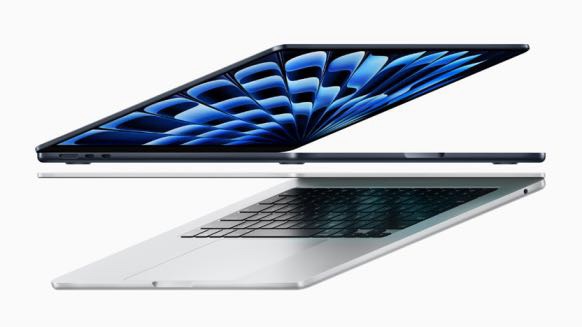
Apple’s MacBooks have built a reputation for elegance, power, and reliability. But here’s the not-so-pretty truth — that same reputation makes them a prime target for counterfeiters. You wouldn’t believe how sophisticated some fakes have become; at a glance, even seasoned Apple fans could be fooled. And when you’re paying a premium price, the last thing you want is a knock-off that runs like a sluggish budget laptop wrapped in a shiny costume.

So, how do you make sure you’re getting the real deal? Let’s go step-by-step, from the obvious signs to the subtle giveaways that only careful eyes (and ears) catch. By the end, you’ll be armed with the kind of knowledge that even an overly enthusiastic seller can’t talk you out of.

Why fake MacBooks exist

You might think — why would anyone go through the trouble of faking a MacBook? The answer’s simple: profit.

A brand-new MacBook Air or MacBook Pro can cost anywhere from $1,000 to $3,000 or more. For counterfeiters, selling a lookalike for even a fraction of that price is still a huge win. And with online marketplaces and informal electronics shops, they’ve got endless opportunities to push these fakes onto unsuspecting buyers.

The scary part? Some counterfeiters don’t just use cheap plastic shells. They sometimes gut an old PC, stuff it into a MacBook-style casing, and run a macOS-like skin on Windows. To the untrained eye, it’s close enough. To your wallet and productivity, it’s a disaster waiting to happen.

The quick gut-check before you buy

Before we get technical, there are a few easy, common-sense checks you should always start with:

  • Too good to be true pricing – If a seller offers you a brand-new MacBook Pro for $400, you don’t need Sherlock Holmes to tell you something’s off.
  • Shady sales location – Legit Apple products come from Apple Stores, authorized resellers, or well-known retailers. A “friend of a friend” in a parking lot? Red flag.
  • No official packaging – Apple doesn’t ship its laptops in plain boxes. Every detail of the packaging — from the weight to the font — is intentional.

If it fails at this stage, you can stop here. But if it passes, keep going — some fakes are built to survive this first layer of scrutiny.

How to identify a fake MacBook

Check the Apple logo

Apple’s bitten apple logo isn’t just branding — it’s one of the most counterfeited parts of the device.

Here’s what to look for:

  • Finish – On a real MacBook, the logo is perfectly smooth, with clean edges. Fakes might have rough borders or slightly uneven surfaces.
  • Lighting – Older MacBooks had a backlit logo; newer models don’t. If a brand-new MacBook from 2024 has a glowing logo, that’s suspicious.
  • Color accuracy – Genuine Apple logos match the overall design finish — whether that’s silver, space gray, or gold. A slightly off shade? Probably fake.

Feel the build quality

This is one of the easiest tells. A genuine MacBook feels like a single, solid block of aluminum — because it is.

Fake MacBooks often:

  • Use plastic painted to look like metal.
  • Feel lighter or oddly hollow.
  • Have hinges that are loose, squeaky, or too stiff.

Run your fingers along the edges. A real MacBook’s machining is precise; you shouldn’t feel sharp spots or misaligned parts. Apple’s manufacturing tolerances are insanely tight — if something feels “off,” it probably is.

Look at the keyboard

Apple’s keyboards — whether it’s the Magic Keyboard or the older butterfly style — have a distinct feel. Counterfeits rarely get this right.

Things to check:

  • Font – Apple uses a specific, clean typeface for its keys. Blurry printing or off-center letters are a dead giveaway.
  • Backlighting – Real MacBook keys have even, soft backlighting. Fakes might have uneven lighting or spill light under the keys.
  • Key feel – Apple keyboards are responsive but not mushy. If typing feels like pressing on a sponge, it’s likely a fake.

Inspect the display

This is where many fakes trip up.

On a genuine MacBook:

  • The screen is bright, sharp, and color-accurate.
  • Bezels are even and tight to the display.
  • The glass is seamlessly bonded to the display panel.

Common fake issues:

  • Washed-out colors.
  • Pixelation or fuzzy text.
  • Uneven bezel width.

Tip: Open a high-resolution image or even the macOS desktop background. If it looks dull or off, trust your instincts.

Boot it up

Here’s the thing: many counterfeit MacBooks can’t run macOS at all. Instead, they use Windows or Linux with a macOS skin.

To test:

  1. Boot the machine.
  2. Press Command Space and type “About This Mac.”
  3. If it doesn’t appear — or it shows weird hardware specs — it’s not a real Mac.

Real macOS has a fluidity that’s hard to fake. Windows with a macOS skin might look convincing in screenshots, but in use, you’ll notice sluggish animations, odd glitches, and mismatched icons.

Check the ports

Apple is extremely consistent with port design. A fake might have extra ports (like VGA or Ethernet) that Apple hasn’t used in years. Or the USB-C ports might feel loose and poorly aligned.

Another easy test: plug in a genuine Apple charger. If it feels wobbly or doesn’t fit quite right, it’s a fake.

Verify the serial number

This is your ultimate truth detector. Every MacBook has a unique serial number — usually printed on the underside of the chassis.

Go to checkcoverage.apple.com and enter it. If the site says the number is invalid or belongs to a different model, walk away.

Counterfeiters sometimes copy real serial numbers from images online, but this trick usually falls apart when the machine’s actual specs don’t match Apple’s database.

Listen to the sound

Real MacBooks have surprisingly good speakers for their size. Counterfeits? Tinny, distorted, and lacking bass.

Play an Apple Music track or a YouTube video at half volume, then at full. A fake will often crackle or distort at higher volumes.

Test the trackpad

Apple’s Force Touch trackpad is in a league of its own. It doesn’t physically click — it uses haptic feedback to mimic a click.

Fakes often use cheap, mechanical trackpads that only click at the bottom. If you can’t click at the top of the pad, that’s a warning sign.

The packaging test

If you still have doubts, check the packaging:

  • Apple’s boxes are high-quality, thick, and precisely printed.
  • The lid lifts slowly due to air resistance (seriously).
  • Accessories are perfectly fitted in their compartments.

Fakes usually skimp on box quality, printing clarity, and internal organization.

Where people get tricked

Here’s a subtle truth — most people don’t get scammed because the fake looked obviously wrong. They get scammed because they were in a hurry, trusted a seller, or got distracted by a great price.

Maybe they met someone in a café, saw a shiny MacBook, powered it on, saw an Apple logo, and handed over cash. Only later did they notice the keys felt strange, or the screen wasn’t as sharp, or macOS updates failed.

Buying safe

If you want to avoid fakes entirely:

  • Buy directly from Apple or an authorized reseller.
  • If buying second-hand, meet at an Apple Store and ask staff to confirm authenticity.
  • Use payment methods that allow dispute resolution — not cash.

Remember — saving $200 isn’t worth losing $1,000 to a scam.

The bottom line

Spotting a fake MacBook comes down to patience and attention. Counterfeiters have gotten good, but Apple’s real machines have a kind of perfection that’s hard to copy. If you slow down, check the details, and trust your instincts, you can spot the imposters before they drain your wallet.

Because honestly, there’s nothing worse than thinking you bought a sleek, powerful MacBook — and realizing you’re stuck with a noisy, sluggish impostor dressed in aluminum.